Bezier curves
Draw flowing Bézier curves with Perlin noise.
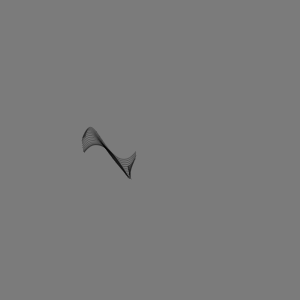
Continues Perling noise.
A bézier curve needs four points: two anchors and two control handles. That is eight numbers per frame. Rolling them at random gives you a new, unrelated curve every frame, so instead we read all eight from the same noise function, each at its own fixed offset, all advancing together.
let off = 0

function setup(){
  createCanvas(300, 300)
  background(80,150,80)
  frameRate(20)
}

function draw(){
  fill(133, 200, 10, 80)
  const [x1,y1] = [noise(off +3) * width, noise(off+6) * width]
  const [x2,y2] = [noise(off +9) * width, noise(off + 12) * width]
  const [x3,y3] = [noise(off + 15) * width, noise(off + 18) * width]
  const [x4,y4] = [noise(off + 21) * width, noise(off + 24) * width]
  off+=1

  bezier(x1, y1, x2, y2, x3, y3, x4, y4)
}
It still looks like static, and that is the step size talking, not the noise. A jump of 1 per frame lands far enough apart in the field that consecutive frames are unrelated, exactly what a large inc did in the previous part. Slow the walk down and the smoothness comes back.
- off+=1
+ off +=0.01
Now each frame is a small deformation of the last, and the accumulating curves read as a single shape being pulled around. What is left is the fill: the solid yellow hides the layering.
- fill(133, 200, 10, 80)
+ strokeWeight(0.3)
+ noFill()
With a hairline stroke and no fill, every frame stays visible and the drift itself becomes the drawing, hundreds of near-identical curves stacking into a surface. The only knob that matters is still the one from part one: how far you step through the noise.
Comments & reactions
Sign in with GitHub to join the conversation.
Comments load as you reach this section.