Perling noise
Explore smooth randomness through curves and 2D noise maps.
<link rel="stylesheet" href="/demo/reset.css">
<script src="https://cdn.jsdelivr.net/npm/p5@2.3.0/lib/p5.min.js"></script>
Random numbers are useless when you want something that looks natural. random() gives you values with no memory, each one ignores the one before it, so you get static, not a landscape.
Perlin noise is one the solutions to fix exactly that. It is a smooth, pseudo-random function: ask it for two nearby inputs and you get two nearby outputs. Ask for distant inputs and the values are unrelated. That single property is what turns noise into hills, clouds, flames and wandering creatures.
The quickest way to see the difference is to draw a line through the values.
Pure random(), every column jumps independently:
let points = []

function setup() {
  createCanvas(300, 300)
  for (let i =0; i < width ; i++){
    points[i] = random(0, height)
  }
}

function draw(){
  background(10)
  stroke(123)
  for (let i = 0; i < width ; i ++){
    line (i, points[i], i+1, points[i+1])
  }
}
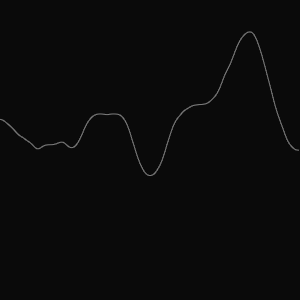
Now the same loop, except we walk along the noise function in small steps (inc) instead of rolling a new die per column. noise() returns a value in 0..1, so we map it to the canvas height:
let points = []
let offset = 0
let inc = 0.02

function setup() {
  createCanvas(300, 300)

  for (let i =0; i < width ; i++){
    points[i] = map( noise(offset), 0, 1, 0, height )
    offset = offset + inc
  }
}

function draw(){
  background(10)
  stroke(123)
  for (let i = 0; i < width ; i ++){
    line (i, points[i], i+1, points[i+1])
  }
}
Same amount of randomness, completely different character: a ridge line instead of noise. The step size is the only knob, a smaller inc zooms in and smooths the curve, a larger one pulls it back towards static.
How Perlin noise is generated
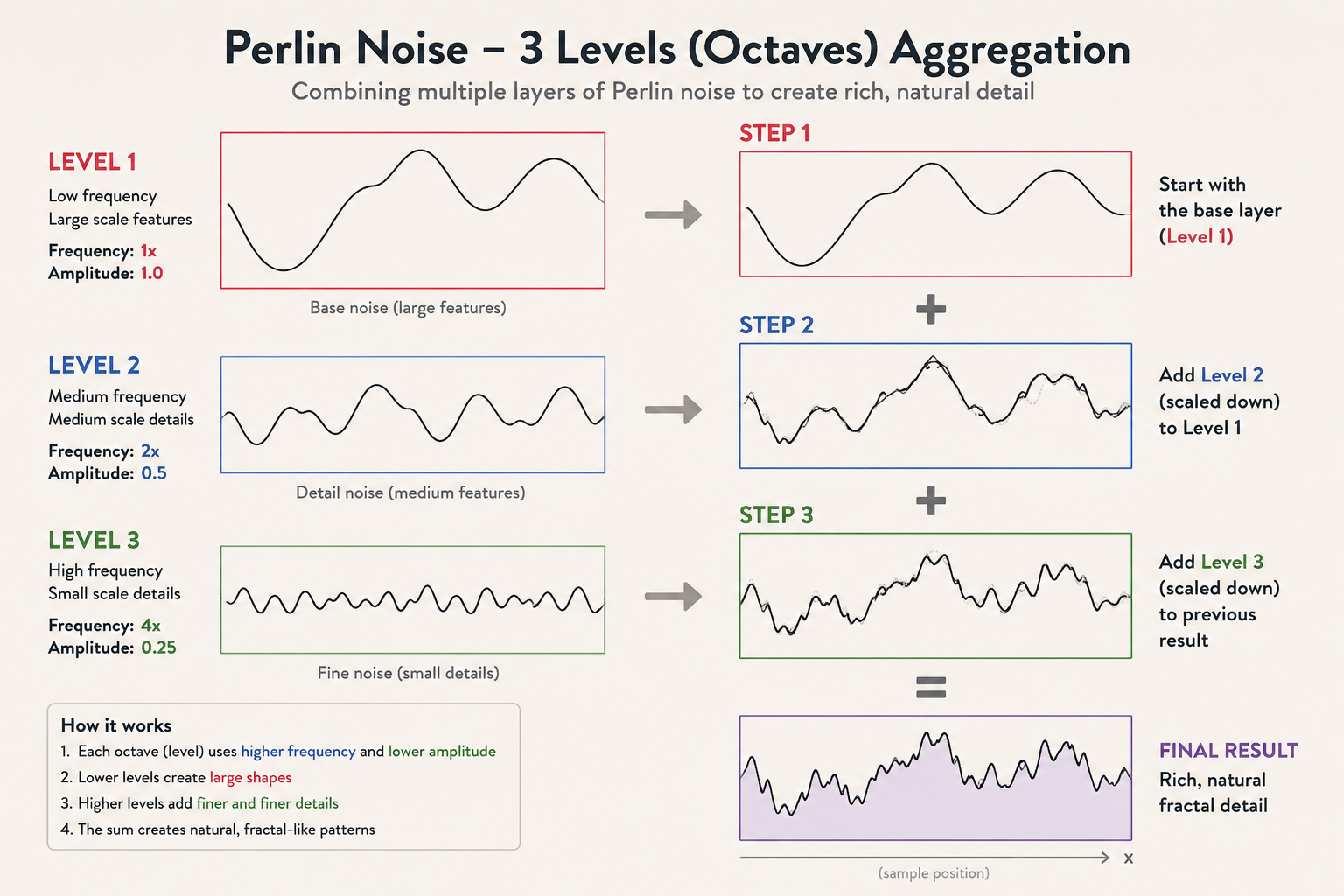
That curve is not one random signal but a stack of them. Three parameters describe the stack:
| variable | purpose |
|---|---|
| Octaves | number of levels of detail |
| Lacunarity | how fast frequency grows per level |
| Persistence | how fast amplitude shrinks per level (influence on the overall shape) |
The recipe:
- each level is a smooth random signal with its own frequency and amplitude;
- level 1 is the base shape, large amplitude, low frequency;
- level 2 is faster and quieter;
- level 3 is faster and quieter still, this is where the fine detail lives;
- the value at each point is the sum of all levels.
Amplitude is a level's weight in that sum: the larger it is, the more that level dictates the shape. Persistence decides how quickly the later, faster levels fade, high persistence gives a rough curve, low persistence a soft one.
In p5, noiseDetail(octaves, persistence) exposes both:
let points = []
let offset = 0
let inc = 0.02

function setup() {
  createCanvas(300, 300)
  for (let i =0; i < width ; i++){
+   noiseDetail(4, 0.25)
    points[i] = map( noise(offset), 0, 1, 0, height )
    offset = offset + inc
  }
}

function draw(){
  background(10)
  stroke(123)
  for (let i = 0; i < width ; i ++){
    line (i, points[i], i+1, points[i+1])
  }
}
Drop to two octaves and the fine wobble disappears:
function setup() {
  createCanvas(300, 300)
  for (let i =0; i < width ; i++){
+   noiseDetail(2, 0.25)
With a single octave only the base shape is left, smooth, almost a sine wave:
function setup() {
  createCanvas(300, 300)
  for (let i =0; i < width ; i++){
+   noiseDetail(1, 0.25)
Five octaves add one more layer of texture on top:
function setup() {
  createCanvas(300, 300)
  for (let i =0; i < width ; i++){
+   noiseDetail(5, 0.25)
Noise map
Noise is not limited to one dimension. Feed noise() two offsets and you get a value per grid cell, smooth in both directions, neighbouring cells hold similar numbers.
let noiseMap = []
let cols, rows, size = 50;
let xoff = 0, yoff= 0, inc = 0.1;

function setup(){
  createCanvas(300,300)
  cols = width/size
  rows = height/size

  for (let i=0; i<cols; i++){
   noiseMap[i] = []
    yoff = 0
    for (let j=0; j<rows ; j++){
     noiseMap[i][j] = noise(xoff,yoff)
     yoff += inc
    }
    xoff += inc
  }
}

function draw(){
  background(123)
  for (let i=0; i<cols; i++)
    for (let j=0; j<rows ; j++){
     rect(i*size, j*size, size, size)
     textAlign(CENTER)
     text(round(noiseMap[i][j],3), size/2 + i*size, size/2 + j*size)
  }
}
Read the numbers row by row and the gradient is already there. Map them to square size instead of text and the structure jumps out:
let noiseMap = []
let cols, rows, size = 50;
let xoff = 0, yoff= 0, inc = 0.1;

function setup(){
  createCanvas(300,300)
  rectMode(CENTER)
  cols = width/size
  rows = height/size

  for (let i=0; i<cols; i++){
   noiseMap[i] = []
    yoff = 0
    for (let j=0; j<rows ; j++){
     noiseMap[i][j] = noise(xoff,yoff)
     yoff += inc
    }
    xoff += inc
  }
}

function draw(){
  background(220)
  fill(20, 50, 40)
  for (let i=0; i<cols; i++)
    for (let j=0; j<rows ; j++){
     let v = noiseMap[i][j]
     rect((.5 +i) *size, (.5 + j)*size, v*size, v*size)
  }
}
That same 2D map is the starting point for terrain heightmaps, clouds and flow fields, the only thing that changes is what you map the value to.
Comments & reactions
Sign in with GitHub to join the conversation.
Comments load as you reach this section.