
Train noise
Build flowing 3D terrain from a Perlin noise grid.
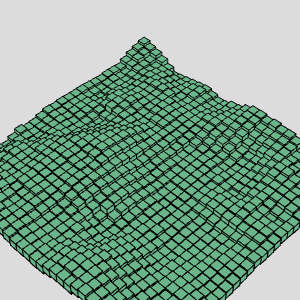
Continues Disco noise.
Last time we got the noise map to breathe. Flat, colorful, dancing squares. Nice.
Now we take it off the page.
Here's where we left off, the disco grid, still 2D, still pretending the world is a sheet of paper:
The plan: turn that flat grid into terrain. Boxes instead of squares, height instead of size, camera tilted so you can actually see it.
And the entry ticket to 3D is embarrassingly cheap, one extra argument:
Yeah. That's it. Everything looks broken now, and that's expected, WEBGL moves the origin to the center of the canvas and your whole mental model of coordinates goes out the window.
So let's back off and learn the rules on something small before we drag the disco into it.
A cube, from scratch
Fresh sketch. Nothing but a box.
function setup(){
  createCanvas(300,300, WEBGL)
  angleMode(DEGREES)   // degrees, because radians are for people who enjoy suffering
}

function draw(){
  background(220)
  box(50) // rect's older, cooler brother
}
Looks like a white square. It is a cube, you're just staring straight down its nose, perfectly aligned, so you see exactly one face.
Depth only shows up when something rotates. Let's hand the wheel to the mouse:
+ let x = map(mouseX, 0, width, 0, 360)
+ rotateX(x)
box(50)
Move the mouse across the canvas. There it is, a cube.
map() here is doing the boring but essential job: canvas pixels in, degrees out. Full sweep left to right, full spin.
Seeing inside
Solid boxes hide everything. Let's go wireframe and drop a dot at the origin, so you always know where the world's center actually is:
function draw(){
  background(220)
  let x = map(mouseX, 0, width, 0, 360)
  rotateX(x)
+ noFill()
  box(50)
+  fill(0)
+  ellipse(0,0,10,10)
}
Now watch the dot while you rotate. It stays put. The cube spins around it. That dot is (0,0,0) and everything in this sketch happens relative to it.
Three axes, three rotations. Same code, different letter:
- rotateX(x)
+ rotateY(x)
- rotateY(x)
+ rotateZ(x)
rotateZ is the sad one, it spins in the screen plane, like rotating a photo. No depth information at all.
Unless you tilt the camera first:
+ rotateX(-45)
+ rotateY(45)
rotateZ(x)
Now we're talking. That -45 / 45 combo is the classic isometric-ish view, and rotations stack: each one applies on top of the previous. Order matters. Swap those two lines and you get a different result, this trips up everyone at least once.
Boxes aren't cubes
box() takes three arguments if you want them: width, height, depth.
box(50)
+ box(50, 100, 20)
Two boxes, both sitting at the origin, clipping through each other like a bad video game. Which is exactly the problem we need to solve before building a grid.
Moving things around: translate
You don't move a box. You move the world, draw the box, then move the world back. That's translate() + push()/pop().
function setup(){
  createCanvas(300,300, WEBGL)
  angleMode(DEGREES)
}

function draw(){
  background(220)
  noFill()

  push()              // save current coordinate system
  translate(50,50)
  box(50)
  pop()               // ...and put it back, or everything after drifts

  box()
  fill(0)
  ellipse(0,0,10,10)  // origin marker, still honest
}
Forget the pop() and every transform accumulates. Your grid slowly walks off screen and you spend twenty minutes blaming WebGL.
Push, draw, pop. Wrap it in a loop and you've got a grid.
Back to the disco
We know enough. Let's drag Disco noise into three dimensions.
Four changes: WEBGL canvas, tilt the camera, center the grid with a translate, and swap rect() for a push/translate/box/pop sandwich.
- createCanvas(300,300)
+ createCanvas(300,300, WEBGL)
...
  function draw(){
    background(220)
+   rotateX(-45)
+   rotateY(45)
  ...
xoff = 0
+ translate(-rows/2 * size, 0 , -cols/2 * size)
  ...
- noStroke()
  ...
- rect((.5 +i) *size, (.5 + j)*size, v*size, v*size)
+ push()
+ translate(i*size, 0, j*size)
+ box(size, 10 , size)
+ pop()
Note the grid now lives on the XZ plane, translate(i*size, 0, j*size). Y is free. Y is where the noise goes.
A floor of flat tiles. Boring. Give it the noise value as height:
- translate(i*size, 0, j*size)
+ translate(i*size, v * size * 5, j*size)
Floating tiles, bobbing on the noise field. Same map from part one, just read as elevation instead of size.
Or, my favorite, don't move the boxes, stretch them:
- box(size, 10 , size)
+ box(size, v * size * 10 , size)
Terrain. Actual terrain, out of the exact same numbers we've been carrying since the first line graph.
That's the whole point of the series, really: the noise never changed. Only what we mapped it to. Line height, square size, bézier handles, color channels, and now Y. One function, five drawings.
Play with the multipliers. That's the knob. It always was.
Comments & reactions
Sign in with GitHub to join the conversation.
Comments load as you reach this section.